
I Want a Personal Computer That Is Actually Personal

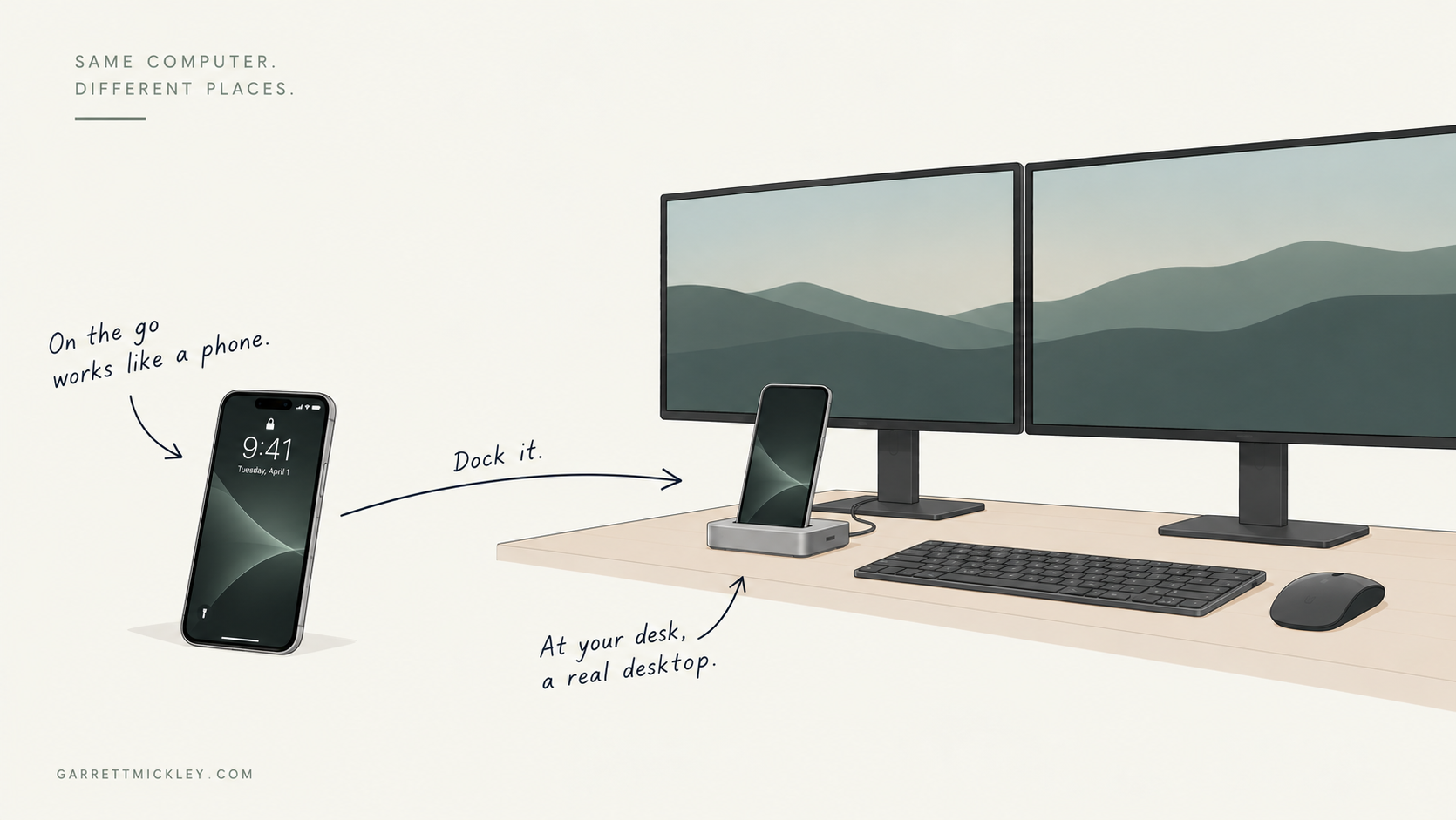
My wife and I have been talking about buying a family computer, which feels like a very 1998 problem to have in 2026.
We have a few old MacBooks around the house, but they’re all Intel Macs. Some are old enough now that they’re simply slow, even after wiping them clean. Amelia doesn’t use a computer much at home, so replacing hers has never been much of a priority. Her phone does almost everything she needs most of the time.
Sometimes it doesn’t.
We’re planning a trip to Japan right now (which she calls “Japlanning”). You can do a lot of that from a phone, but eventually it gets annoying. You’ve got hotel listings, maps, dates, prices, flights, train information, browser tabs. Sometimes you want a big screen and a keyboard.
I’ve ended up in almost the same situation for completely different reasons. I have a recent iPad, and now that Logic runs on it, most of the things that used to keep me on a Mac don’t anymore. I sometimes think I’d like a gaming PC, but I already have a Switch, Mac, iPad, and iPhone full of games distracting me. I’m probably good.
The one thing I still really need a traditional computer for is coding. Right now I use the M1 MacBook Air from my day job for that, which means the computer keeping me tied to a traditional desktop operating system isn’t even my own computer.
I work from home, so most of that happens in the home office. My day job also has access to a shared office we use occasionally, usually when Dadboss and I need to get together and work through something in person. If I’m working alone away from home, I’d honestly rather go to a coffee shop.
Amelia actually goes to an office. She has a desktop there with two monitors, keyboard, mouse, printer, the usual setup.
At home, we’re setting up one room to handle a few different jobs: a music area for me, a work area for me, and a work area for her. We’re not talking about a giant room, either. Our hypothetical family computer would probably live near the music setup anyway because I’d want to use it with the recording gear.
So we’ve been thinking about buying one desktop for the home office. Amelia could use it when she needs it. I could use it when I need it. The rest of the time it could just sit there.
A family computer.
Again.
The more I think about it, though, the more ridiculous it seems. We already own two very powerful personal computers. We carry them around in our pockets every day.
What we really need is the desk.
I Thought This Was Where We Were Going
I’ve imagined some version of this since before smartphones were really a thing. As computers kept getting smaller, I assumed eventually I’d have one little computer that went everywhere with me.
When I was out, I’d use whatever portable interface it had. When I got home, I’d plug it into a big monitor with a keyboard and mouse and use it like a desktop. Then I’d unplug it and take it with me again.
That idea has been stuck in my head for years because it always seemed like the obvious direction.
Computers kept getting smaller. They kept getting faster. Eventually the computer would be small enough that I could carry my computer everywhere.
Well, we did that part.
I have a ridiculously powerful computer in my pocket. When I get home, I put it on the charger on my desk and pretty much stop using it. I grab my iPad or my work MacBook instead.
I’m actually using my phone less and less even when I’m away from home. I have an 11-inch iPad now that fits in my day bag, so if I’m sitting somewhere and want to actually do something, I’ll often pull that out. The phone stays in the bag.
That part matters to me. I don’t really want to spend more time staring at a phone. If anything, I think putting the entire internet in our pockets and making it available in every idle moment was probably a mistake. I miss when using a computer usually meant going somewhere, sitting down, doing whatever you were there to do, and eventually getting up and walking away.
I don’t think carrying my computer with me has to mean using it constantly. I’d rather carry it until I decide it’s time to sit down and use it.
And if my iPhone could properly become a desktop computer when I docked it, I probably wouldn’t need the iPad either.
We’ve spent the years since smartphones became ubiquitous building increasingly clever ways to make all of these separate devices work together. My files sync. My passwords sync. My photos sync. My browser knows what tabs I had open somewhere else. Apple’s Continuity and Handoff can move work from one device to another.
It’s impressive technology, and I use it all the time. It also makes me wonder why I’m moving between so many computers in the first place.
I only want one.
Dock the Phone
The version I want is pretty simple.
I’m out somewhere and my iPhone works like an iPhone. I get home and plug it into a dock in my home office. That dock is connected to my monitors, keyboard, mouse, Ethernet, speakers, webcam, storage, audio interface, and whatever else I keep at that desk.
The monitors turn on and I get a desktop.
I mean a real desktop. I don’t want a giant phone interface stretched across a 32-inch monitor. Give me windows, proper multitasking, keyboard shortcuts, a useful file manager, external drives, multiple displays, and applications that understand I’m sitting in front of a keyboard and mouse now.
When I unplug the phone, those same applications can go back to behaving like phone apps.
That distinction is important. The phone can still be useful while I’m out without trying to cram my entire desktop life onto a six-inch screen. The big sprawling computer experience can wait until I actually sit down somewhere and ask for it.
I don’t have to transfer anything before I leave because I’m taking the computer with me.
People have already built pieces of this. Canonical demonstrated Ubuntu for Android in 2012. You could use Android as a phone and then dock the same device to a monitor and keyboard to get an Ubuntu desktop. Canonical later expanded the idea into “convergence,” where the same operating system and applications would adapt across phone, tablet, and desktop.
Microsoft tried its own version with Continuum. A compatible Windows phone could connect to a display, keyboard, and mouse and provide a PC-like interface while the phone itself remained usable.
Samsung got even closer and has stuck with it. DeX still lets compatible Galaxy devices run a desktop-style environment on an external display.
Google is now pushing Android itself further in this direction. Its current developer documentation covers desktop windowing on connected displays, including resizable windows and support for keyboards, mice, trackpads, cameras, microphones, and other peripherals.
We’ve been circling this idea for more than a decade. It still hasn’t become the normal way we think about personal computing.
They Tried It. It Didn’t Take Over.
Ubuntu gave up on phones and convergence. Windows Phone died. Samsung has been shipping DeX for years without causing everyone to throw their laptops away.
There were some pretty big problems with those attempts.
Microsoft had a particularly nasty one with Continuum. Traditional Windows desktop applications couldn’t simply run locally on the phone. Microsoft’s documentation suggested remote access as a way for businesses to get traditional Win32 applications into a Continuum setup.
That’s a pretty big limitation for something that’s supposed to replace your PC.
Ubuntu had an even harder job. Canonical was trying to establish another smartphone platform while Android and iOS already owned the market. When Canonical ended its phone and convergence work in 2017, Mark Shuttleworth said the company was moving investment toward areas that were producing growth, especially cloud and IoT.
I don’t think any of this proves that convergence secretly would have taken over the world if those companies had just tried harder. Maybe it wouldn’t have.
It does mean those experiments came with baggage that has very little to do with the basic idea. Microsoft was asking you to use Windows Phone. Canonical was asking you to join an entirely new mobile ecosystem. Samsung DeX still has to deal with Android apps that were designed around phones and touchscreens.
The version I’m interested in is the one where the phone you already wanted to own can also be your computer.
Phones Have Changed Since 2012
The other obvious problem with those early attempts is right there in the dates.
Ubuntu for Android was demonstrated in 2012. Microsoft introduced Continuum during the Windows Phone era. Compare the phones we carried then with what we’re carrying now.
Apple’s current iPhone 17 Pro has an A19 Pro processor, hardware-accelerated ray tracing, USB 3 up to 10 Gb/s, and DisplayPort video output up to 4K HDR.
I don’t need a benchmark chart to make this personal. Logic Pro runs on my iPad, and Apple supports it on iPads going all the way back to the A12 Bionic.
I can already do serious music production on mobile Apple hardware. That was one of the big reasons I used to need a Mac.
Coding is the big thing I still can’t move over. Xcode doesn’t run on my iPhone. A proper desktop development environment doesn’t appear when I plug my phone into a monitor.
Those are software and platform limitations. There are still hardware limitations too, and some of them matter a lot.
The Phone Doesn’t Have to Do Everything
A phone has limited RAM. It has limited cooling. It has limited storage compared with some desktops. It can’t hold a giant graphics card, and asking a little battery-powered device to sustain a heavy workload for eight hours is different from running the same workload for a few minutes.
The dock gives us room to compensate for some of that.
The obvious version already works today. A dock can provide:
- displays;
- Ethernet;
- external storage;
- audio and other USB devices;
- keyboard and mouse;
- power.
I’d add active cooling too. Heat is one of the reasons small devices have trouble maintaining peak performance. Apple made a new vapor chamber and better sustained performance part of the pitch for the iPhone 17 Pro. If my phone is sitting in a dock on a desk, we have space and power for a better cooling system.
From there, I’d like the dock to do more over time.
USB4 can tunnel PCI Express, and external GPUs are already a use case for USB4 on platforms that support them. That doesn’t mean I can connect an eGPU to my iPhone today. Apple would have to design the hardware and software to support it. The basic concept of a small computer using powerful external graphics hardware is already here.
Memory is harder. You can’t plug a USB RAM stick into an iPhone and give it another 32 GB. Technologies such as Compute Express Link do allow computers to expand and share memory, but that’s server-class technology that requires support throughout the hardware architecture.
I don’t expect to buy a CXL iPhone dock next week. I do think it gives us a direction.
A cheap dock might only provide ports, displays, power, and cooling. A more capable one could have fast internal storage and better display hardware. Eventually a workstation dock might contribute serious graphics or AI processing. Future architectures could find ways to expand memory too.
Or maybe we just go all the way and build the Megadongle.
At that point we’ve started putting a lot of computer hardware back on the desk. That’s fine. The expensive hardware can belong to the workspace.
This Doesn’t Kill the Desktop
I can already hear somebody telling me about the workstation they built with 128 GB of RAM and a GPU roughly the size of my cat.
Keep it.
There are plenty of people who need desktop computers. There are people editing feature films, rendering giant 3D scenes, compiling enormous software projects, running local AI models, doing scientific work, and playing games at settings that would cause my iPhone to burst into flames.
There are also people who just like desktops. That’s a perfectly good reason to own one.
I’m asking for another option.
For my own life, the calculation has changed. Music production no longer requires a Mac for me. Web browsing obviously doesn’t. Email doesn’t. Writing doesn’t. Photos don’t. Most of my day-to-day work doesn’t. I can already do nearly all of it on an iPad.
I’m getting surprisingly close to owning a traditional computer because I need a handful of traditional-computer things.
That’s why I like the idea of moving some of that power into the workspace. If I need a serious GPU at my desk someday, put one there. If Amelia sits down at the same desk later, she can use it too. We don’t each need to own a copy of every expensive component.
The dock can be shared. Our computers stay personal.
Every Desk Becomes Useful
This is where I’ve always thought the idea gets really interesting.
If the dock becomes a standard thing, I can go to a friend’s house and use their desk. I plug in my phone and my desktop appears with my applications, files, settings, and accounts.
When I leave, all of that leaves with me.
Hotels could have docks. Libraries could have them. Schools could have them. Offices and coworking spaces could have them. My day job’s shared office could have one too. Instead of hauling a laptop there for the occasional day Dadboss and I need to work together in person, I could dock my phone and get my normal working environment.
You could build a very nice workspace without putting a whole personal computer at every seat.
I actually like that this still makes the workspace important. I don’t want the future of computing to be me hunched over a phone doing everything everywhere. If I want to work, browse the web for a while, make music, or disappear down some research rabbit hole, I’m perfectly happy having to go somewhere and sit down to do it.
The computer can travel with me without the desktop following me around all day.
There is an immediate security problem with plugging the device that contains your entire digital life into some random hotel dock. I wouldn’t trust one either.
Operating systems would need to treat unfamiliar docks and peripherals as untrusted hardware. Apple already limits how a locked iPhone communicates with wired accessories. A system built around docking should go further and let me decide what a new workspace gets access to.
Something along these lines would make sense:
- display, keyboard, mouse, and power are allowed;
- networking asks permission;
- storage asks permission;
- cameras and microphones ask permission;
- unknown hardware gets nothing until I approve it.
The exact security model is for people smarter about hardware security than I am to figure out. “Don’t automatically trust a USB device because I wanted to use its monitor” seems like a reasonable starting point.
There is also a nice side effect when you’re finished working. Pull the phone out and the computer is physically gone.
There Are Downsides
Putting more of my computing life onto one physical device creates a very obvious single point of failure.
If my phone breaks, I’m having a bad day. If I lose it, I’m having a worse one.
Owning several computers gives you redundancy, and some people will always want that. I probably would too, especially for work that matters.
We already have to take phone security and recovery pretty seriously, though. My phone has passwords, authentication, payment information, messages, photos, and access to most of my online life. Losing it today isn’t exactly a minor inconvenience.
Backups still matter in the computer I’m describing. Cloud storage still matters. Remote servers still matter. If I destroy my phone by doing something stupid, I want to be able to buy another one, authenticate myself, and restore my environment.
Battery wear is another real concern. Keeping a phone connected to power at a desk all day isn’t ideal for a lithium-ion battery. Apple already lets newer iPhones set charge limits specifically to reduce wear from frequent charging and long periods connected to power. A device built around docking could manage power and heat much more aggressively.
None of these problems needs to be waved away. They’re engineering tradeoffs. Desktops and laptops have their own pile of tradeoffs too.
I still want the choice.
Apple Is Already Most of the Way There
This is especially frustrating in Apple’s ecosystem because so many of the pieces already exist.
The iPhone can output video. The iPad supports keyboards, mice, external displays, storage, and professional software. Apple has spent years building tools that help applications adapt to different screens. Apple silicon means the company’s phones, tablets, and Macs now share much more architectural DNA than they did in the Intel Mac era.
Then there’s Continuity, Handoff, iCloud, Universal Clipboard, and everything else Apple has built to make several Apple devices cooperate.
It works remarkably well. I just keep wondering what happens if Apple follows that idea all the way through.
I don’t think Apple is secretly holding this back because it wants to force me to buy an iPhone, iPad, and Mac. I have no evidence of that, and there are plenty of technical reasons this still isn’t a complete product.
There also isn’t much financial incentive for Apple to make three product categories collapse into one. The current arrangement works pretty well for them: I buy an iPhone, maybe an iPad, maybe a Mac, and Apple makes all three work together beautifully.
From where I’m sitting, I’d rather buy one really good personal computer and spend the rest of the money on whatever interfaces and shared hardware I actually need.
Or, again, the Megadongle.
Back to the Family Computer
So Amelia and I may buy a family computer.
I’d rather buy the family desk.
The funny part is that we already own most of it. Between the two of us, we probably have enough monitors, keyboards, mice, webcams, speakers, and other peripherals sitting around to build two or three desks. We don’t need two or three desks. Most of the time, we don’t even need two computers at the same time.
Put the best of that stuff at one desk and add a dock.
Amelia sits down to do some Japlanning and plugs in her iPhone. Her stuff appears. She gets the big screen and keyboard she wanted. When she’s finished, she pulls out the phone and walks away with her computer.
A few hours later, I sit down. The monitors are sitting there waiting for somebody. I plug in my phone and the same desk becomes my workspace. Maybe I need more of the hardware attached to it than she does. Fine. It’s there.
When I’m finished, I pull out my phone and walk away with my computer too.
That’s actually part of what appeals to me about this. I want the computer to belong to me and travel with me, but I don’t need the whole internet demanding my attention everywhere I go. I still like the idea that using a computer can mean going to a place, sitting down, and then getting up when I’m done.
We’ve spent decades making computers smaller and more powerful. We finally made them small enough to carry everywhere, which is exactly what I always assumed would happen.
I just thought we’d do more with that.
I’m not ready to get rid of every desktop or laptop, and I don’t think everyone else should either. I just don’t understand why the computer I already carry everywhere can’t be enough for people like me who are getting pretty damn close already.
Maybe that’s all I really want from the next era of the personal computer: make it more personal.
I can carry the computer with me without having to live in it.